Direct Printing · Printer Fleet Manager · Odoo 19
Print from Odoo. Straight to the printer.
One click on an invoice, delivery slip, purchase order, or label - rendered on the server and sent directly to the device over raw TCP 9100, IPP, or CUPS. No browser print dialog. No desktop client. No cloud relay. No API keys. No subscription.
Included in Printer Fleet Manager · $499 one-time · Odoo 19 Community & Enterprise
Watch it print
A live, unedited run: one-click printing from an invoice, print routes, automation rules, and the job queue.
Why no agents? Because the server already knows your printers.
Other direct-print approaches bolt printing onto Odoo from the outside - a cloud relay plus a per-desk client, or a tray app on every workstation - because they have to reach printers the Odoo server cannot see. Printer Fleet Manager works the other way around: it already discovered and monitors every printer on your network, so when Odoo runs on-premise the server just opens a socket to the device and prints.
1
The module knows the device
Discovery and SNMP monitoring give it every printer's IP, port, protocol, and live status - kept current automatically.
2
Odoo renders on the server
The document is rendered as PDF or ZPL server-side. Nothing depends on the user's browser or desktop.
3
Socket straight to the printer
Bytes go over raw TCP 9100, IPP 631, or a local CUPS queue - on your LAN, and only your LAN.
- No per-desk clients to install, license, or update
- No cloud relay and no third-party API key - print data never leaves your network
- No Enterprise-only dependency - works on Odoo 19 Community and Enterprise
One click from the document header
Invoices, delivery slips and pickings, sales orders, and purchase orders get a header Print button. Click it and the document comes out of its resolved printer with a success toast - no dialog, no PDF download, no selecting a device every time.
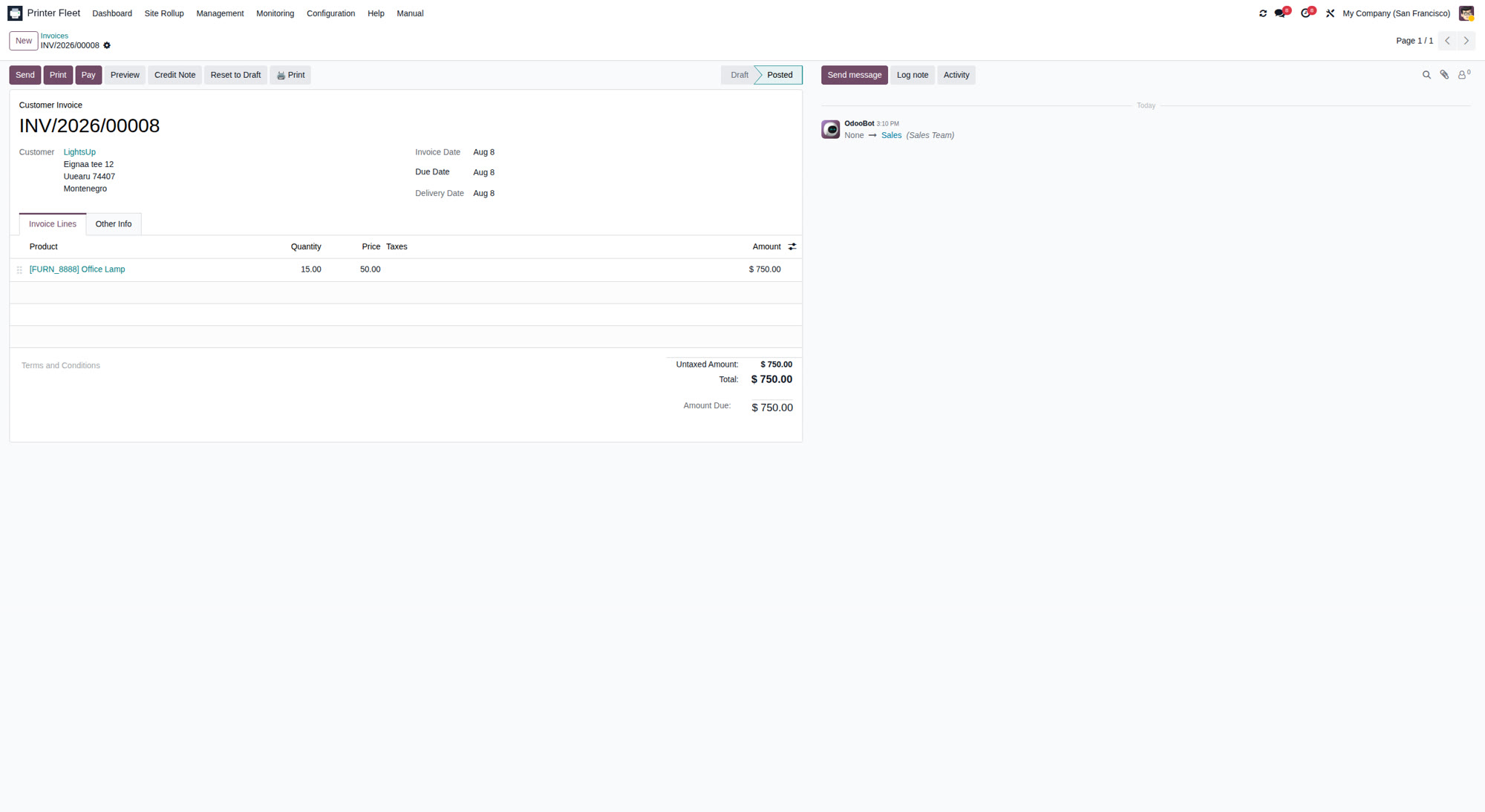
Six-level routes send every document to the right device
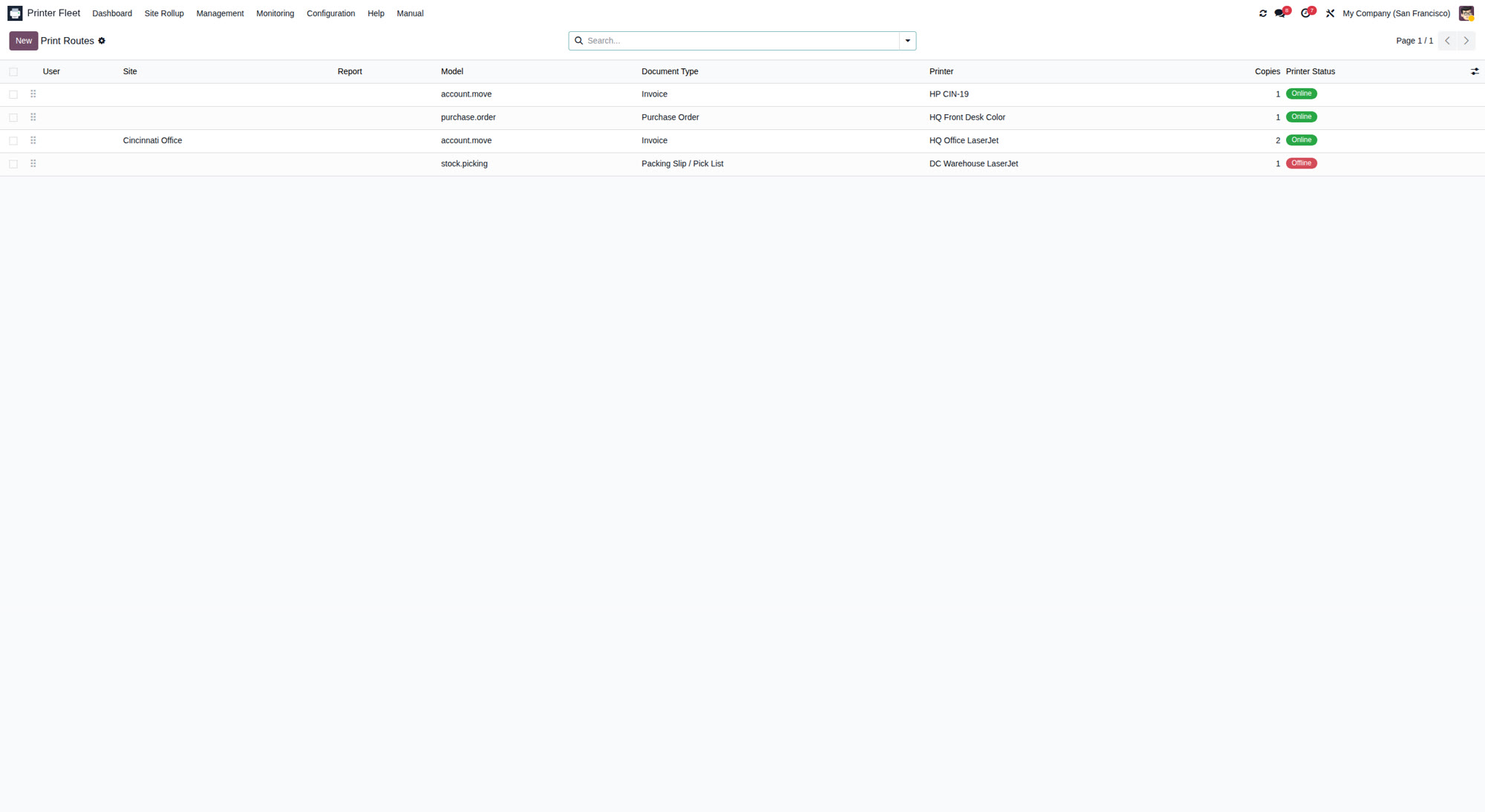
Print routes resolve along a priority ladder - user and report, user and document type, site and report, site and model, then global defaults - so a pick list prints in the warehouse, an invoice at the front desk, and a ZPL label on the label printer, automatically. The first time a document has no route, a picker asks once, and a Remember checkbox saves the answer.
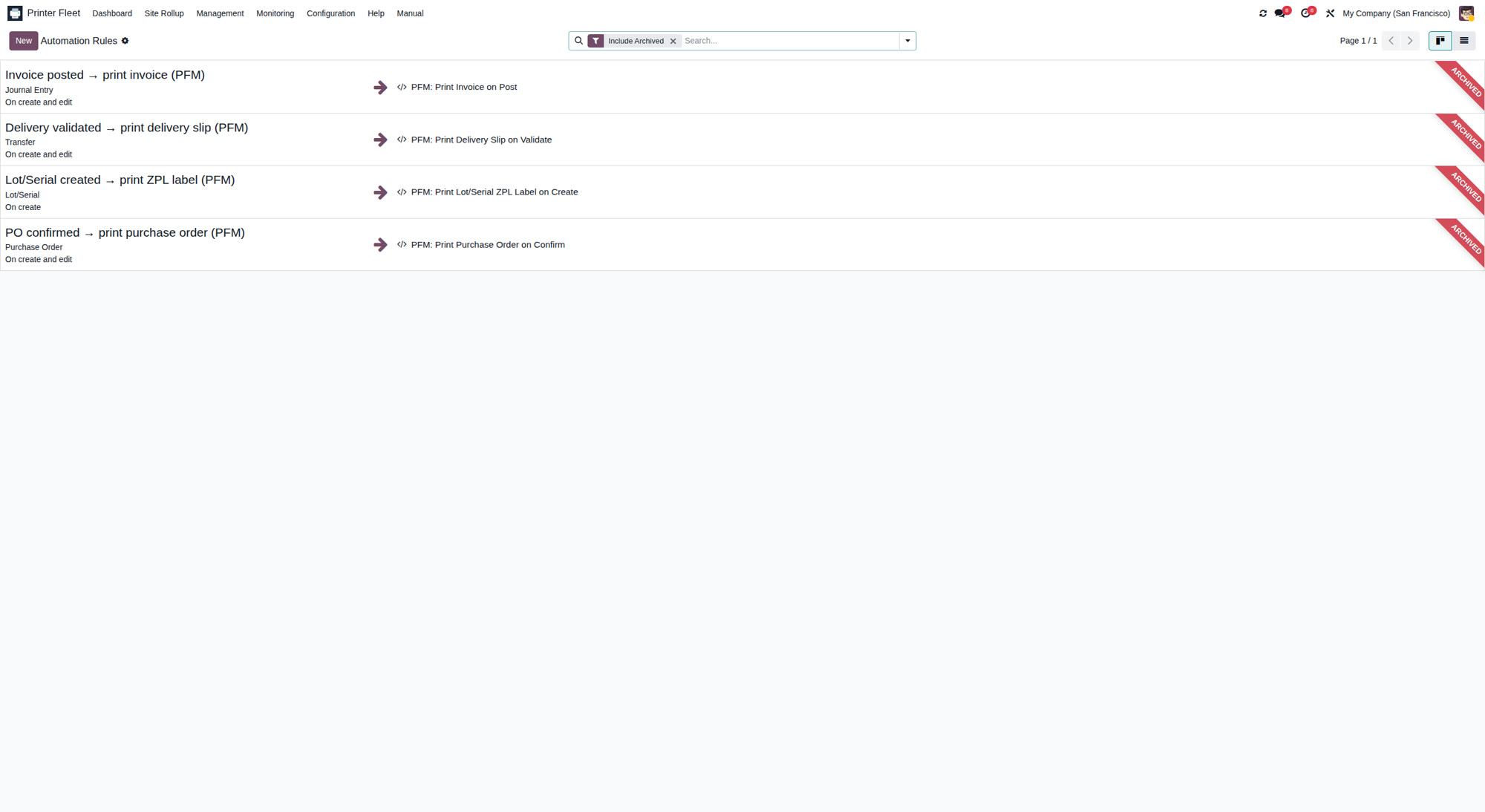
Print-on-validate automation, with a safety net
Ready-made automation rules fire a print on business events: invoice posted, delivery validated, purchase order confirmed, lot or serial created. They ship disabled by default so nothing prints unexpectedly, and a Test Fire button runs the real print path against the latest matching record before you switch one on. If a print fails, your invoice still posts and your delivery still validates - the job is held with a clear note, never a rolled-back transaction.
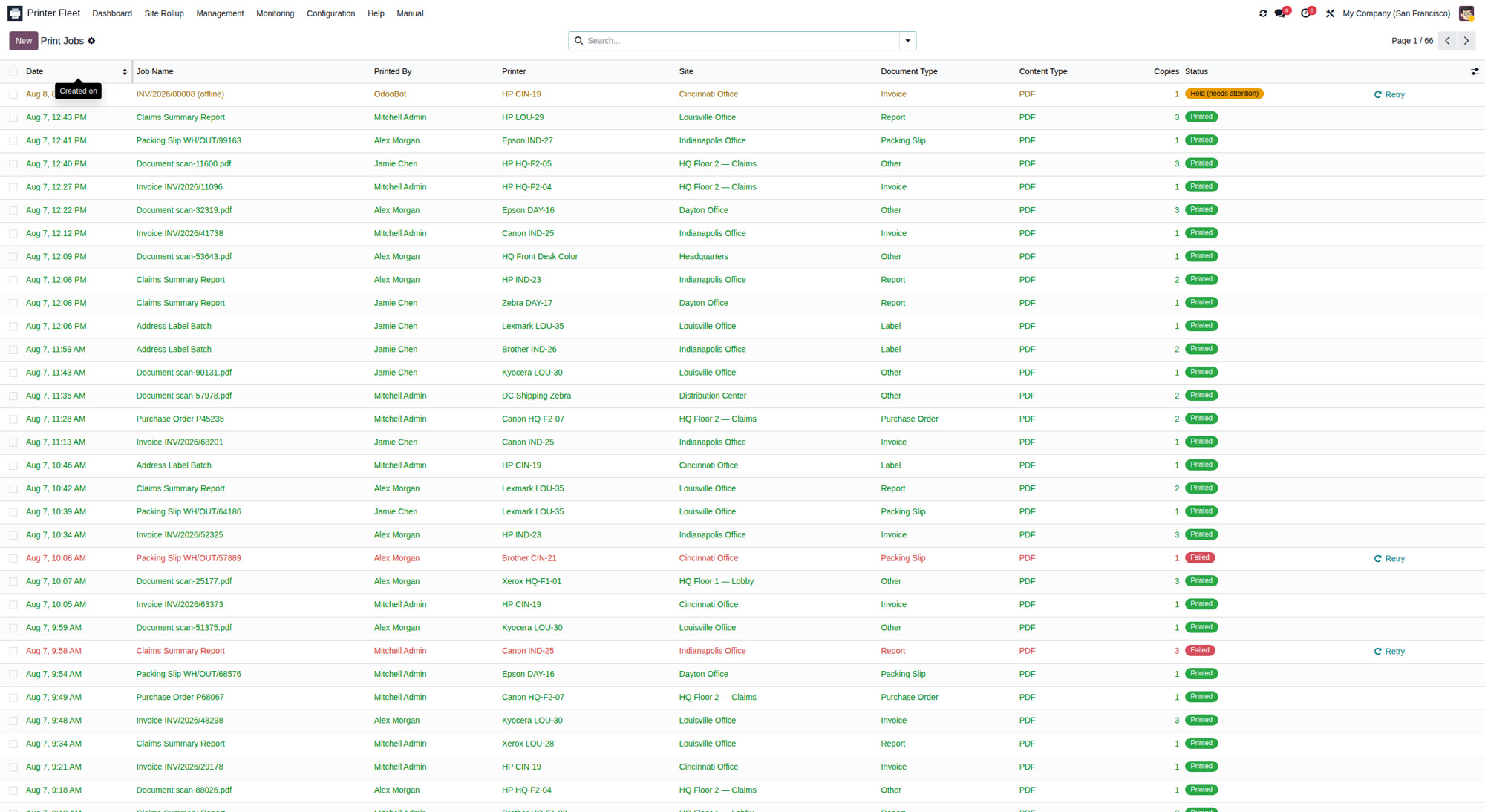
Every job tracked, every failure recoverable
Print jobs are records with a full lifecycle - pending, sending, sent, printed, failed, held, cancelled - plus a retry counter and a one-click Retry. A printer that was offline comes back, you retry its held jobs in one click, and an automatic retry cron backs you up. A reachability test pings every configured printer and tells you exactly what the server can reach.
Honest scope
Direct printing needs the Odoo server to reach your printers over the network. That is exactly how most on-premise SMB and warehouse deployments run - and where Printer Fleet Manager shines. A cloud-hosted Odoo database cannot open a socket to a printer on your LAN; if that happens, the module detects it and gives you a clear diagnostic and a download fallback instead of pretending it printed. Deployment: Odoo.sh or on-premise; Odoo Online is not supported - Odoo Online does not permit installation of third-party Python modules.
The complete direct-printing feature list
Everything the printing side of Printer Fleet Manager does - nothing held back.
Printing Engine
- Agentless, server-side printing - no desktop client, no cloud relay
- Raw TCP 9100, IPP 631, and local CUPS queue transports
- PDF and ZPL rendering - label printers over 9100 included
- QWeb reports rendered on the server, independent of the browser
- Success toast on every print - no dialog, no PDF download
One-Click Printing
- Header Print button on invoices, deliveries and pickings
- Header Print button on sales orders and purchase orders
- Bridge modules auto-install only for apps you actually use
- First-run printer picker with copies selector
- 'Remember for this report' saves your default in one tick
Print Routing
- Six-level route resolver: user, document type, site, then global
- Pick lists to the warehouse, invoices to the front desk - automatically
- Per-user default print site for deterministic resolution
- Routes managed in a simple list view - no code
- ZPL label routes for dedicated label printers
Print Automation
- Print-on-validate rules: invoice posted, delivery validated, PO confirmed
- Lot/serial created fires a ZPL label print
- All rules ship disabled by default - nothing prints unexpectedly
- Test Fire button proves the real print path before go-live
- Editable standard Odoo Automation Rules - extend them freely
Job Queue & Reliability
- Every job tracked: pending, sending, sent, printed, failed, held, cancelled
- One-click Retry on held and failed jobs
- Bounded auto-retry cron backs up manual retries
- A print failure never blocks or rolls back the business document
- One-click reachability test for every configured printer
Privacy & Honest Scope
- Print data never leaves your network - straight to the printer IP
- No third-party API keys and no per-seat client licenses
- Works on Odoo 19 Community and Enterprise
- Clear diagnostic + download fallback when the server cannot reach a printer
- Deployment: Odoo.sh or on-premise
No subscription. No PrintNode. No per-PC client.
Every mainstream direct-print option for Odoo needs either a recurring cloud print service or a client app on every workstation. Printer Fleet Manager needs neither for network printers - and the same license includes the fleet monitoring none of them offer at all.
| Printer Fleet Manager | Cloud-relay print modules | Print-service connectors | |
|---|---|---|---|
| Module license | $499 one-time - every feature included | Typically $100-$250, charged per Odoo version | Module often cheap or free |
| Cloud printing subscription | None | Recurring cloud fee | Recurring print-service fee, for as long as you print |
| Per-PC client software | None for network printers | Client app to install, license, and update | Client on every print host |
| Fleet monitoring, toner alerts, auto-reorder RFQs | Included | Not offered | Not offered |
| Cost after 3 years | $797 with Maintenance & Support renewed ($499 + two optional $149 renewals) - or just $499 if you let it lapse; the module keeps working | Module price per version + 36 months of cloud fees | Module price + 36 months of print-service fees |
Competitor figures are typical Odoo Apps Store ranges for direct-print modules as of August 2026 - check each vendor for current pricing.
Simple, honest pricing.
ONE LICENSE. EVERYTHING INCLUDED.
$499
one-time · includes 12 months of ModuleSmith Maintenance & Support
- All features included - nothing held back
- Odoo Community and Enterprise
- 12 months of Maintenance & Support included
- Offline activation for air-gapped servers
- Optional renewal: $149/year
Maintenance & Support includes technical assistance, product updates, and supported major Odoo-version upgrades released while your plan is active. Renewal is optional - your purchased module continues to operate if Maintenance & Support expires.
Sold under the OPL-1 license. Odoo Apps Store listing coming soon. Deployment: Odoo.sh or on-premise. Odoo Online is not supported - Odoo Online does not permit installation of third-party Python modules.
Ready to print with one click?

Premium Odoo modules, forged with care.
Contact
Terms of Use · Privacy Policy · Terms of Sale · Refund Policy · Maintenance & Support
© 2026 ModuleSmith · All rights reserved · Odoo is a trademark of Odoo S.A. ModuleSmith is an independent vendor.